Tuesday, August 21, 2007

Rules for Successful BAM implementation

I learnt from my experience that by observing following rules BAM execution can become fairly smooth: Some of the steps are not "need to have" but rather "good to have".

1) Install SQL 2005 sp2
2) Ensure Analysis Services is installed (Else cubes/aggregations can't be created)
3) Do not forget to Configure BAM tools to "Enable Analysis Services for Aggregation" using Biztalk config tool. (Else cubes/aggregations can't be created)
4) Ensure that account being used is a member of the Group that is configured in Biztalk Config tool for BAM portal. (Else views in BAM portal may not be visible to the user )
5) Ensure that the user account under which BAM Application Pool is running is member of Biztalk Isolated Host and IIS_WG group.
6)Run following commands: (Else you may get 401 authentication error)

  • cscript adsutil.vbs SET w3svc/NtAuthenticationProviders "NTLM"
  • setspn -A HTTP/servername domain\account
  • setspn -A HTTP/servername.fullyqualifieddomainname domain\account

domain\account is account under which BAM App Pool is running on IIS.

cscript can be found under: C:\Inetpub\AdminScripts

setspn.exe can be found under the Windows 2003 CD-ROM at \support\tools\suptools.msi


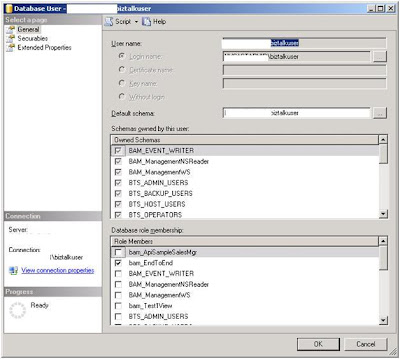
If you view the BAM portal but can't view all the "VIEWS" you created. It is most likely that the account you are using does not have permissions on "BAMPrimaryImport" table. Add that account (i.e, biztalkuser) and then assign the role (view) you want that user to see on BAMPortal. Check the image below:


In the image above. The user (biztalkuser) only have permission for bam_EndToEnd. If you want this user to see other views that you can for example click on "bam_Test1View". User will now be able to see both views on BAM portal. This way you can selectively grant users access to different views(roles).

Please note: SQL 2005 creates Roles. You just have to assign them to the appropriate user. SQL 2005 does not supports concept of "Groups" anymore. Instead use Roles.

Friday, August 17, 2007

Strange behavior of Biztalk 2006 on SQL cluster environment

While testing Biztalk application on server farm mode at one of my client, I came across something interesting. This biztalk application used SQL adapter to connect from orchestration to execute stored proc. All tests for server farm went OK. Biztalk server fail over sequence worked fine. Net scala worked fine for web farm. We ran into issue when we tried failing over SQL cluster from original (initial) node to another. On the original node, everything worked perfect. On failing over to second node, I found that Biztalk application would not connect to the custom database to execute stored procedure. We thought may be it is a connection pool caching issue. We tried restarting the physical biztalk servers and hosts. Nothing worked. Then I thought that may be it is something to do with 32 Bit SQL adapter not working properly on 64 bit cluster (not a very smart assumption on retrospection). We also played with MSDTC settings by reducing the authentication level. Nothing worked. The fact that threw me off was that everything was working fine on original node. We only had one physical copy of entire Biztalk database on cluster and not multiple database instances. So, it did not make sense to me as if why the same database was acting differently with different instances of SQL on each node.

I thought logically for 4 hours and tried different things. Nothing worked. I came back next day and starting thinking out of box or rather illogically. We gave explicit permissions to Biztalk service account on the "custom" database that contained stored procedures. We made Biztalk service account database owner and wolla! it worked! Yeah that simple! We could not understand the behavior but it worked. We thought of doing further post mortem. We took the permission away and failed over to original cluster node. It worked as it was working before. For some reasons Biztalk did not care for permissions while working on original node. We failed over again to second node without the permissions and it did not work again. We granted the permissions and it worked!

We left the solution in that working state! But could not explain the reason for this behavior. We have couple of theories but none of them convincing. Is it a Bug? May be. Is it a cluster configuration? May be.

Tuesday, August 07, 2007

Biztalk and SilverLight

Gloves are off! MSFT is going head on against Adobe. With recent launch of Silverlight, a product that will compete against market leader Flash. MSFT dreams to snatch some serious business from Adobe. With Java version not lagging behind, market has just started heating up.

SilverLight will enable developers deliver rich browser based applications. Great new tool for web developers. Richer out of Box BAM portal is one area that Biztalk can gain from this new development. Rich BAM portal with interactive charts and graphical real time display of data can really grab attention of Business Users. How about adding this on Biztalk 2008 wishlist!

Monday, August 06, 2007

Implementing Business Rule Engine

This weekend I got down and dirty with BRE (Business Rule Engine). It is a powerful tool for managing dynamic business rules. It is very efficient in complex logic scenarios. I thought of playing with it and worked out some scenarios.

Scenario:


Company wants to categorize its workers under different “Bonus” levels to decide on dollar value of annual bonuses. Each bonus level is based on variables like Number of Projects sold, Dollar value of each project sold. Is it a new client or existing one? Other variables like future potential etc can also play in. This business logic can change over period of time and needs to be controlled by Business Analysts/ Management team. That means no complex SQL queries. In real world scenario, this means having a policy that can interact with multiple databases/tables on client side. This policy can be invoked by a webservice . This webservice will pass on objects as facts in the BRE. BRE will then update the specified columns in the database with the correct “Bonus” categories.

Scenarios can range from simple scenarios that take single object as input fact to complex scenarios that take multiple objects.

Proof of Concept :

1) Create a simple database called “TestRules”.
2) Create a table called “Customers”
3) Define 3 columns: Author, ID and Status
4) Create a policy called “Testing”.
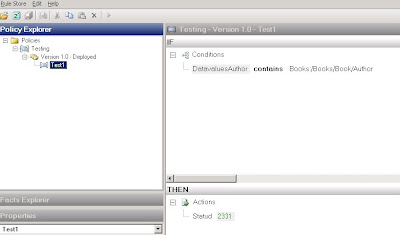
5) Under this policy, define a rule “Test1” (Image 1)
6) Define 2 Vocabularies TestBRE 1.0 and 1.2 (Image 2 and 3). Difference between them will be the nature of “Binding”. I will explain that later on.

Email me for complete solution @ shashi_1273@yahoo.com


Image 1:

Image 2 (Database Binding type as DataConnection )
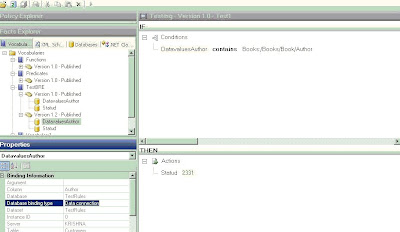


Image 3 (Database Binding type as Data Table/ Data Row )
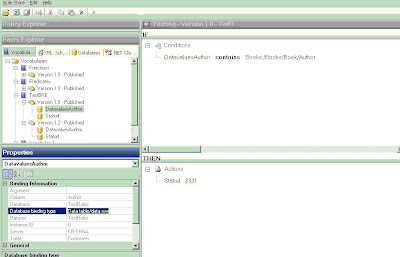


There are 3 facts in the rule:


1. Name of Author (Coming from Database)
2. Input Object on right hand side of “Contains”. This can be a simple string that gives the lookup value as name of the “Author”. In a complex scenario this can be an XML object that contains multiple Fields for “Author”. These name(s) will be then matched against the “Author” column of database “Customers”.
3. StatuD under the action pane. This will be updated based on above 2 facts.


This policy can then be invoked by a WebService . This webservice will use Policy.execute method after passing the required object parameters. For this Proof of Concept solution we will use following combinations:

1) Passing Single Object as Parameter:

In this case the object passed will be database connection only. The second fact can be a hard coded string i.e. “Shashi”. In 2 object scenario we will use an XML object instead of "string". This XML object will be array of values.

Implementation for 2 object scenario will cover this section too.


2) Passing Two Objects as Parameter:

In this case the object passed will be database connection and a XML document. This XML document can contain multiple fields and one of the fields can be “Author”. This “Author” field can have multiple names. In our sample we have 3 names: Shashi, Kent and Jeff.

a) Database Binding type as DataConnection
b) Database Binding type as Data Table/ Data Row

Both of the above types can be set up while using Wizard to creating Vocabulary. Use DataConnection type if the count of rows returned is more than 10 (http://blogs.msdn.com/biztalkbre/ ). Otherwise use Data Table type. Also for Long Term Facts that are based on Caching, use Data Table/ Data Row Type. Reason being that no additional benefit will be gained by caching Dataconnection object as Connection Pool already does that. Implement IFact Retriever for Long Term facts. For this particular example, we will not use Long Term facts.

Important thing to note is that in case of Database facts ( with binding type Data Table/ Data Row ) and XML facts, Typed objects need to be used. .Net facts do not need any “Typing”. You will see in the implementation how both XML and Database facts use TypedXMLDocument and TypedDataTable respectively.

It is a good practice to create a tracking file to understand how BRE works and this file can also be used as a Debugging tool.

Implementation for Case a)


SqlConnection conn = new SqlConnection("Integrated Security = SSPI;Database= TestRules; Server =(local)"); // establish connection to server

conn.Open(); //open the connection

DataConnection dc = new DataConnection("TestRules", "Customers", conn);

XmlDocument xd1 = new XmlDocument();
xd1.Load(@"C:\BiztalkProjects\BRE\TestSmall.xml");
TypedXmlDocument doc1 = new TypedXmlDocument("Books", xd1);
object[] shortTermFacts = new object[2];
shortTermFacts[0] = doc1;
shortTermFacts[1] = dc; // Note: No Typed dataset being used in this implementation

Policy pol = new Policy("Testing",1,0);
DebugTrackingInterceptor dtraking = new DebugTrackingInterceptor("ShashiOut.txt");

try
{ pol.Execute(shortTermFacts, dtraking);
dc.Update();
conn.Close();
}
catch (Exception ex)

{ System.Console.WriteLine(ex.ToString()); }

Implementation for Case b)


SqlConnection conn = new SqlConnection("Integrated Security = SSPI;Database= TestRules; Server =(local)"); // establish connection to server

conn.Open(); //open the connection

SqlDataAdapter da = new SqlDataAdapter("select * from Customers", conn); // create adapter to fill dataset .

//------explicitly define Update method for database adapter object. Directly using da.update will give error

SqlCommandBuilder commBldr= new SqlCommandBuilder(da);

commBldr.GetUpdateCommand();

da.UpdateCommand = commBldr.GetUpdateCommand();

//...

DataSet ds = new DataSet("TestRules"); // create a dataset

da.Fill(ds, "Customers"); //fill dataset

//....Not required for Single Object scenario
XmlDocument xd1 = new XmlDocument();

xd1.Load(@"C:\BiztalkProjects\BRE\TestSmall.xml"); //xml instance to be passed

TypedXmlDocument doc1 = new TypedXmlDocument("Books", xd1);

//............

TypedDataTable tdc = new TypedDataTable(ds.Tables["Customers"]);

// Only pass one fact (tdc) for single object scenario (First scenario)
object[] shortTermFacts = new object[2];
shortTermFacts[0] = doc1;
shortTermFacts[1] = tdc;

Policy pol = new Policy("Testing",1,0); //Major and Minor Versions

DebugTrackingInterceptor dtraking = new DebugTrackingInterceptor("ShashiOut.txt"); //writes the debug file under the "bin" folder.

try

{ pol.Execute(shortTermFacts, dtraking);
da.Update(ds,"Customers");

conn.Close();

} catch (Exception ex)

{ System.Console.WriteLine(ex.ToString()); }

}

}

}

Take Away :

1) While testing a Policy, BRE create Database connection/objects. While executing the policy from .net class, database objects need to be explicitly created.

2) It is a good practice to create tracking file while executing policy. This can help to troubleshoot issues while development. It can also be compared with the tracking log that is created by Business Rule composer when Testing a policy. This way we can observe the list of parameters that policy is expecting and make sure that these parameters are correcly passed while executing the same policy from outside Rule Composer. By comparing these 2 logs, I was able to figure out when policy is expecting TypedXMLDocument and TypedDataTable.

3) DataSet object and XML document have to be passed as "Typed".

4) The 2 Object scenario can be extended for multiple Objects.

5) I know it is very painful to copy and create new versions of policy whenever any modifications are required. Same applies to vocab. Following SQL commands can ease that pain by undeploying the policies/vocabs and allowing users to do modifications. It is highly recommended that these commands are used only in Development phase.

For Policies:

declare @RuleSetId Int
select @RuleSetID =nRuleSetID
FROM re_Ruleset
WHERE strName = 'Testing'
AND nMajor=1 and nMinor=0
UPDATE re_ruleset
SET nStatus =0
WHERE nRuleSetID = @RuleSetID
DELETE FROM re_deployment_config WHERE nRuleSetID=@RuleSetID
DELETE from re_tracking_id WHERE nRuleSetID=@RuleSetID

For Vocabs:

UPDATE re_VocabularySET nStatus = 0 /* to republish make it back to 1 */
WHERE strName = 'Vocabulary1' AND nMajor =1 AND nMinor=0

I think BRE is a very powerful tool if used properly. Key is to use it for complex scenarios that can leverage functions like Update, Assert, Retract. Using it for simple queries is an example of under utilization of tool. In terms of performance, BRE will work better than traditional SQL query in case of complex scenarios.

It is not truely a Business User tool. Concepts of version, vocabulary and facts are not easy for a business user to understand. Also, the fact that any policy that deployed can't be changed unless a new version is created is not helpful either. Developers are required for initial set up and creating new vocab etc. Business users can definitely change variable values that are already set up. They will need some training to do more than that.

I would imagine that MSFT understands these concerns and we can definitely see improvements in subsequent versions.
Tuesday, July 31, 2007

Biztalk Best Practices

We recently finished a Biztalk Project with one of our client. It was a 4 week project with tight deadlines. Our team did a great job to deliver quality product on time. I joined the project midway after 2 weeks and finished error handling and fine tuning. The overall architecture of the project was straight out of “Biztalk Best Practices” book. This was one of the reasons it turned out to be successful. I would recommend everyone this approach as documented by Marty.

Scenario:

1. Main Orchestration A will be kicked off by a web service or a File Drop (as back up)
2. Orch A will send Email informing users using Orch B (Email Orch).
3. Orch A will then trigger 5 Different Orchestration (C,D,E,F and G) in a pre-defined sequence. 4. This sequence will be set up during design time. Some of these orchestrations will execute in
parallel.
5. Each of these orchestrations (C, D,E,F and G) will call Orch B after each call before control
goes to next orchestration in sequence.
6. Users will click on Email and that will trigger web application. This web application will send a "correlation" ID back to one of the orchestration (C,D,E,F and G) and that will complete the orchestration. Thus sending control to next orchestration.

Our approach:

1. Use Multipart messages
2. Use Direct Binding through Message Box to link multiple orchestrations.
3. Use separate project Internal and External Schemas
4. Never expose Internal Schemas directly to entities outside Biztalk.

Great deal of information can be found at:

http://msdn.microsoft.com/msdnmag/issues/07/05/BizTalk/default.aspx

We could have also gone with the (Partner Port) approach. This approach would have reduced some of the Orchestration code we had to put for changing the promoted values to eliminate the chances of "infinite loop". But then we would have lost on "flexibility". and client demanded flexibility.

Wednesday, July 25, 2007

Using Correlation in Loop

Using Correlation set within a Loop is not a straightforward process in biztalk. One way around this is to define a Scope and within the scope define the correlation sets . This scope will be within the loop . With each iteration of Loop, correlation set will be instantiated again. This approach can lead to overheads due to addtional persistence points in form of transactional scope. Another approach that I recently used in a direct binding scenario is use of "Null Adapter". Have a dummy send shape outside the loop that initiate the correlation set. Use "Null Adapter" with this send port.

DebugViewer in Biztalk

"DebugViewer" is another cool feature that comes with Biztalk 2006. Actually it is part of Studio 2005. Simple steps to use it:

1) Download and Install the tool from http://www.microsoft.com/technet/sysinternals/Miscellaneous/DebugView.mspx.

2) Use System.Diagnostics.Debug.WriteLine ( " Write the Message Here") inside Orchestration to display the message.
3) Check the capture menu on tool to ensure that all options are check marked except the last one (Log Boot). By default they are.
4) You can even filter the events on the viewer. Add a prefix before the message and use this Prefix to filter. Example: Use System.Diagnostics.Debug.WriteLine ( Prefix +" Write the Message Here") . Filter gives both "include" and "exclude" options.

PS: Ensure that you are using "Development/Debug" mode while deploying the assembly. Debug command does not work with"Release/Deployment" mode. This is added benefit of using Debug namespace. There is no need to remove these lines of code while moving from development to deployment version. These lines will be supressed in the deployment version by design. Not quiet the case if System.Diagnostics.EventLog.WriteEntry namespace is used. In that case, these lines will have to be removed when moving from development to deployment version. Else there will be performance hit.

Friday, June 22, 2007

SWIFTNet Adapter

I started looking into SWIFT as an apparent area of push by Microsoft into financial sector. For people who have not worked in Financial services sector. SWIFT stands for “Society for Worldwide Interbank Financial Telecommunication”. SWIFT is both a standard body and a secure network like VAN. It also provides software solutions. This secure network connects various banks and corporations. Helping them to settle payments resulting from various buy and sells trades. It is also known as SWIFTNet.

Microsoft introduced first SWIFT accelerator with Biztalk 2004. Biztalk 2006 contains updated version of SWIFT accelerator (version 2.3). Partnership with SWIFT to develop SWIFT accelerator and out of box Rules via Rules Engine is an important strategic move from MSFT to capture Financial Services Market. It is aimed at targeting Back Office where all the trade settlements take place. Java technologies reign supreme in the front end of the trading spectrum using FIX protocol. MSFT aims to capture the back office market that is relatively less volume per day. Here, more emphasis is paid on Security and Reliability and less on speed.

Microsoft is leveraging its influence on Global Banking Industry to push SWIFT standards and SWIFT-BizTalk combination. Internally, MSFT is in process of implementing this solution for its Treasury/Accounting department. It is using in-house implementation as a case study for various corporations and banks to implement Biztalk-SWIFT combination.

Technically, it is a great solution. Users can use Infopath templates to change the Messages. Then use Biztalk as single point of contact to connect with SWIFT network. All the Relational validations in incoming/outgoing message are created using BRE and hence are easy to change by non-technical users. This provides greater degree of flexibility and control in the ever changing world of Banking/Financial Regulations.

Monday, May 14, 2007

Passed my Certification Exam!

I passed by Biztalk 2006 Certification Exam Today. I would say that I am more relieved than happy. I have One regret though, I wish I was working on Biztalk in my Current project. My last Biztalk Project was 3 months ago and it was heavily tilted towards Biztalk 2004. Ongoing real world project experience in Biztalk 2006 would have definitely helped my preparation . My preparation was spread just over TWO weekends. I used 2 weekends (4 days) to go over Two Books: Biztalk Recipes - 2006, Biztalk - 2004 Unleashed. Tried my hands on SDK samples for BRE/BAM and read as much I could read from Microsoft website. I was sleep deprived on these weekends :)

I will not recommend the approach I took. I had to take this approach because of my situation. Ideally, I would recommended to spend at least 2 days on doing BAM, BRE and other examples from SDK. Working on ongoing Biztalk project will definitely give an edge while preparing for exam. There will be no need to specially allocate time to prepare for the exam like I had to do. I knew that Orchestration, Messaging and Administration were my strong areas. For this reason, I made an effort to focus more on areas like BAM, BRE and Role Link that are not my strengths.

Percentage breakdown of my preparation:

1. 50% of my time on BAM, BRE and Role Links
2. 20% on Orchestration, Messaging
3. 10% What is new in Biztalk 2006
3. 10% on Deployment and Administration
4. 10% on Random Readings on Biztalk Blogs.

Saturday, April 21, 2007

Wild Wild World ....

It has been a while since I sat down in front of my computer to do any Blogging. I joined a new company in February and then took a 2-week vacation. I came back and have been working like crazy. Current project has been very challenging and a great learning experience. It is not an Integration Project and I am diversifying into area of Business Intelligence. I am working on collecting Business Requirement for a Financial System and also doing Project Management. Also providing direction to the financial department in the face of changes they have been going through lately. Doing this I am facing the classic dilemma: to diversify or to specialize?

I love working on Business Integration Projects involving Biztalk and this is my core strength. At the same time I want to get more exposure to other aspect of technologies to give me a broader perspective while dealing with Business Problems and providing the solutions. Well, there are definitely pros and cons of each approach. One of the immediate challenges I am facing is that I have my Biztalk 2006 exam due in less than a month and I still have no plan in place to prepare for the exam. I have been struggling to take out some time but the present project is really demanding and does not leave me anytime on week or on the weekend. The only time I get is at night but then I am too tired to do anything. Fact that I am not working on Biztalk project also does not help me in putting my mind in the right Biztalk perspective at the end of the day when I sit with my Biztalk book to prepare for the exam.

I really need to find a way to put a plan in place and I have to do it soon! Wish we had a 40 hour day.

Thursday, February 22, 2007

BAM Deployment Error


I received following error while deploying BAM project in Biztalk 2006. Error read “BAM Deployment failed.
Encountered error while executing command on SQL server “server name”.
Incorrect Syntax near ‘@@Error’.
Must declare scalar variable “@@UniqueID”.”

Screenshot of the error is below:


I opened the tracer log at SQL server level. I extracted the stored procedure that was giving me an error and ran the stored procedure directly on the server. I got following error:

Msg 102, Level 15, State 1, Procedure bam_Test1_UpsertInstance, Line 15
Incorrect syntax near '@@Error'.
Msg 137, Level 15, State 2, Procedure bam_Test1_UpsertInstance, Line 68
Must declare the scalar variable "@@UniqueID".
Msg 137, Level 15, State 2, Procedure bam_Test1_UpsertInstance, Line 111
Must declare the scalar variable "@@UniqueID".
Msg 137, Level 15, State 2, Procedure bam_Test1_UpsertInstance, Line 140
Must declare the scalar variable "@@UniqueID".

I changed the two variables representing the name of BAM activity “Error” and “Unique ID” to “Exception” and “TransactionID” respectively. Ran the command line for deployment and Bingo it worked!!

It seems that Biztalk uses these 2 variables (Error and UniqueID) internally and will not accept them as user defined variables. There may well be more than two of these variables that will cause similar errors. Well, if we get similar error again then it is very likely that we stepped on some more of these variables.

MOM Architecture

MOM is another great tool to monitor distributed Biztalk environment. It can easily configure alerts to trigger some activity. This activity can be like sending an email to a person or a group. It can be running some batch file or a script. This event/error based triggering is very helpful while administering a widespread distributive environment. It enables people to take necessary action at right times.

The basic components that constitute MOM are captured below.


Wednesday, January 24, 2007

Another Successful Implementation

Months of hard work finally helped us execute another successful BizTalk Implementation this week. This was the reason that I was not able to Blog for past few months. I spent past 3 months managing and organizing the activities for the BIG implementation. It was a great team work and everything fell in place. Hours and Hours of work finally paid. Impact of implementation can be understood from the fact that entire system was off line for the users for almost a week! There were about 5 cross functional teams with about 100 people working on this Big Implementation. World wide offices were under the impact. Biztalk was a major part of the complete implementation if not the entire implementation. Every thing has to be timed to perfection between all the teams to get flawless implementation.

I also want to share a piece of code that I created as a workaround for existing process in place. With the recent implementation the transaction volume is projected to increase FOUR folds both in frequency and size. The present implementation is very database centric as all the business validations are run through queries in Oracle. This leads to instance of “connection pool time out” issues. Even though the code is optimized, this issue is something that we have not been able to completely eliminate. There are definitely some ideas architecture wise that can help. But we neither have budget nor time to implement them. So the workaround for that is to control or throttle the number of transactions passing through Biztalk. Since we can’t tell users not to send files in multiple batches, one thing we can do is to control the execution from our end.

The Plan:

1) Create a common folder that will receive the files
2) Create a way to copy the files from this folder to biztalk pick up locations and then delete the files. The following code is the core of the solution that will do the job.
---------------------------------------------------------------------------
Private Sub Button3_Click(ByVal sender As System.Object, ByVal e As System.EventArgs) Handles Button3.Click
Dim fileNameCollection() As String
Dim totalFiles As Collection

Dim ActualFilename As String
Dim LastIndex As Integer

Dim SetFolder As System.IO.Directory


fileNameCollection = SetFolder.GetFiles("C:\FileMover\") ' set source folder
Try
Dim i As Integer
For i = 0 To fileNameCollection.Length - 1
LastIndex = fileNameCollection(i).LastIndexOf("\")
ActualFilename = fileNameCollection(i).Substring(LastIndex + 1)
System.Threading.Thread.Sleep(10000) (May not be required when used as scheduled job)

System.IO.File.Copy(fileNameCollection(i), "C:\FileMover\Archive\" + ActualFilename, True)
System.IO.File.Delete(fileNameCollection(i))

Next

Catch
Finally

End Try


End Sub

------------------------------------------------------------

This code will be further made database configurable using SQL database. The variables being “Folder Locations”, “Number of files to be dropped” and “Time Interval” between each file.

Another possible use of this application can be during stress testing. Instead of manually dropping the file, this application can drop them automatically after all the parameters are configured. So switch on the performance indicator and go home! When you come back all the test statistics will be written in the file.

Tuesday, September 19, 2006

Optional Fields in FF Schema

My tryst with FF Schema continues. In this edition it is the optional field settings that I will be tackling. I have a positional file with following structure.

A 123 456 789
B 735 323 456
C 824 359 531

A occurs 1 to unbounded
B occurs 0 to unbounded
C occurs 0 to unbounded

For optional group (B and C) I created a delimited level and made nillable = "true" and minoccurs ="0". I did same settings for positional group. I am not sure if it required at both levels so I did as a safety measure.

Now for some reasons, C started acting like an optional record but NOT B. I tried playing around with delimiter settings etc but nothing worked. Then I thought of change parser optimization property at root element. Default is "speed" and I changed it to "complexity" and bingo it worked. It seems that default parser setting did not recognize Min occurs ="0". But it is strange as it worked for C level.

I Googled the issue and I found out that people faced the same issue and did what I did. If only, I would have seen these sites before. I would have saved a DAY!

Tuesday, August 29, 2006

Flat File Schema and Early Termination

For those who have worked with Flat File Schemas, must have used or at least heard the property called "Early Termination". This Property is exposed with Biztalk SP2 but otherwise it can only be edited using Text editor. There is some kind of confusion as if what happens if the "Early Termination" is set to True.

Let me illustrate it with an example:

Suppose FF schema have 5 fields (A,B,C,D and E) and each 10 in length. The file looks something like:

AAAAAAAAAABBBBBBBBBBCCCCCCCCCCDDDDDDDDDDEEEEEEEEEE.

Now if we set up "Early Termination" as True. The following scenarios are parsed properly and rest fail in Biztalk schema.

1)AAAAAAAAAABBBBBBBBBBCCCCCCCCCCDDDDDDDDDDEEEEEEE (Parsed)
2) AAAAAAAAAABBBBBBBBBBCCCCCCCCCCDDDDDDDDDDE(Parsed)
3) AAAAAAAAAABBBBBBBBBBCCCCCCCCCCDDDDDDDDDD (Not Parsed)
4) AAAAAAAAAABBBBBBBBBBC CCCCCCCDDDDDDDDDDE (Parsed)

So this property only allows flexibility for the last field in the schema.

I faced a situation in a project where Source system sent a file that looked something like:

AAAAAAAAAABBBBBBBBBBCCCCCCCCCCDDDDDDD

It sent less than 5 fields (say 4) and the last field in the file (not in the schema) was partially or completely filled. In Either scenario it will be rejected. Problem was that Source System was very inflexible and would not change the file to suit Biztalk parsing needs.

There were different options that I thought of. I knew that we have to pad the file but question was how to do that. Since Biztalk schema does not pad the incoming file but only pads the outgoing file. And we were receiving the file so we could not use padding.

The other option was do create a pipeline component that would read the stream and pad it before it hits the Biztalk FF schema. Or create some kind of pre processor (windows service) that would do that padding while reading the stream.

It seemed as stream manipulation would be the only way to get around this issue but I wanted to avoid it as I am not a BIG fan of stream manipulation because of inherent dangers associated with it.

So, I thought hard and it clicked to me that I could use the padding property of Biztalk schema to achieve what I needed. All I need to do is to turn the padding property "inside out". In other words. I did the following:

1) Created a simple orchestration with one receive and send shape.
2) Defined a schema with one element only. This way one can take 5 fields together as single field and then use padding property to pad from the last position of incoming field to the maximum positional; length of the complete record in the schema. 50 in our case.
3) In the schema set Padding as Left justified and use Hexadecimal value of "Tab".
4) Define a single message with above schema
5) Create a send pipleline that refers to this single schema with padding.
6) Recv and Send Port will refer to same message.

Complete the orchestration and then drop the file. For a file like:

AAAAAAAAAABBBBBBBBBBCCCCCCCCCCDDDDDDD

The output will be padded to complete length of 50.

Then run this file through original FF schema with 5 fields. It will be parsed properly and will give you the right XML.

Saturday, July 15, 2006

Validating an Instance in Biztalk

How can one validate an instance of the input file and ensure that the required fields needed for business process are present, data type is correct and min/max lengths are conformed with. This is done to filter “junk” data going into Business Database and to maintain Database Integrity. Further if one needs to catch the errors and populate a database it becomes even more complicated. So what can be done?

Biztalk 2004 has no ability to validate instance on the fly and accumulate errors at once. But, Dot Net offers “SchemaValidation” class to validate the input instance and errors that are trapped can be accumulated and passed as a string through a stored procedure to a SQL/Oracle database. This is how it works.

1. Pass “Instance” and the “Schema” to the schema validation class.
a. Instance is the sample XML message that is to be validated.
b. Schema is the xsd schema that will contain all the information about the required fields, data types, lengths etc.

2. Creating the “tight” schema is a tedious process especially if the file is long. Each field has to be selected and the properties set.

a. For required fields.

i. String type: Set following properties in schema

1. Base Data Type : string
2. Derived by: Restriction
3. Nillable : False
4. Min Occurs: 1 (empty is 1 too)
5. Max length = as required
6. Min length = 1
ii. Date type:

1. Base Data Type : Date
2. Derived by: Restriction
3. Nillable : False
4. Min Occurs: 1 (empty is 1 too)

iii. Integer type

1. Base Data Type : Integer
2. Derived by: Restriction
3. Nillable : False
4. Min Occurs: 1 (empty is 1 too)
5. Max Facet value = as required
6. Min Facet value = as required

b. For optional fields

i. String:

1. Base Data Type : string
2. Derived by: Restriction
3. Nillable : True
4. Min Occurs: 0 (empty is 1 too)
5. Max length = as required
6. Min length = 0

ii. Date Type:

1. Base Data Type : date
2. Derived by: List
3. Nillable : True
4. Min Occurs: 1 (empty is 1 too)

iii. Integer type

1. Base Data Type : Integer
2. Derived by: List
3. Nillable : True
4. Min Occurs: 1 (empty is 1 too)

Note: Decimal Types follow same rules as Integer types. It is not possible to control the lengths for Decimal and Integer OPTIONAL fields from Biztalk schemas. To do this use .Net class that can read the length and validate it in next stage and reject or accept depending on the results.

3. After this “tight” schema is created put this in a folder. Do NOT forget to append a namespace to this schema before passing it in the .Net class. The .Net Class will not work without namespace.

Thursday, May 25, 2006

Creating FF Schemas in Biztalk - A Different Approach

One of my projects requires integrating a file from a Bank into our financial system. The Bank file is a positional flat file with 8 records. The structure is as follow:


1 – File header
......2 – Transaction header
................5 – Voucher Line
................5A – Distribution Line
................5B - Vchr Tax Line
.......7 – Transaction trailer
8 – File Trailer


All the records can occur multiple times in the file. In past, I always had problems creating FF schemas for positional files especially in area of looping. Surprisingly the approach I took this time made it very easy . I will try to break it down in small easy steps:

I will not go in details of "postional" record entry but focus only on "Looping"

1) I used the “Bottoms-Up” approach (this is what I call it). I broke the file into smaller segments and designed starting from the deepest child element and then added other elements as I moved towards the top. i.e Record 5 to Record 1. And then I designed for rest of the file. i.e Record 5 to Record 8.

2) I first designed the schema for only Record 5. I assumed that the file has only 3 records that can repeat multiple times within a root level. The structure looks something like:


5, 5A and 5B are the positional records that repeat multiple times. So they will have to be under a “delimited” record that has max occurs as “unbounded”. This delimited record will have name “Level5” and Child Delimiter type as "Default Child Delimiter" and Child Order as "Infix". I used the same properties for all the "Delimited" levels.

3) Having designed Level 5, I then designed Record 2 . I followed the same principle. Since Record 2 is parent of Record 5, I placed it one level higher than Record 5 but at the same level as the delimited record “Level5”. Record 2 is positional record like Record 5 and can occur multiple times. So it will again go under “delimited” record that has properties as “unbounded”. We will name it as “Level7_2”. As it shared by Record 2 and Record 7 as we will see later.


4) I followed the same logic with Record 1 that is parent of Record 2.
5) Having completed the “Middle to Top” path, I started symmetrically copying the same looping from “Middle to Bottom” to get the entire structure which will look like:


6) At end do not forget to add 1 root delimited record (Root) above Level1_8 that will occur as Single.

7) The last important thing is to set up the properties of the “Schema” node as below:

Friday, April 28, 2006

"Debugging is not supported under current trust level settings"

If you get the following error while trying to open ASP.net page on the host server.

"Debugging is not supported under current trust level settings"

You will also get 500 error if you hit this page using HTTP POST method from any other machine. This is what you do:

Open the web.config file for the ASP solution and add the "BOLD" text below.

(opening tag)system.web(closing tag)

(opening tag)trust level="Full" originUrl="" (closing tag)

Friday, April 07, 2006

Biztalk Server 2006 Clinic- Summary

I attended the Biztalk 2006 clinic on Wed 4 th April at MSFT Office in Iselin,NJ. It was very informative. I left wanting to know more about BAM though. For some reasons it feels as there is so much that can be done with this tool. But lack of documentation always gets me. I have tried my hand on it and honestly I do not feel it very flexible and intuitive. BAM portal addition in 2006 is certainly a positive step. Acceptance of BAM by Biztalk community can dramatically increase the value offered by Biztalk. As a Business user nothing is better than able to use BAM. I scribbled some notes from the clinic that I am posting. These notes came handy while making a presentation to my team.


---------------------------

The presentation started with videos of some companies that are using Biztalk 2004 at present and how they are benefiting from it:

1) INVENSYS: Uses for manufacturing plant
2) Balboa: Financial/Insurance Company

These companies’ uses “Rules Engine” that enables Managers/Operational people to change the variables based on scenarios. This provides them with flexibility

Showed Funny Video We-SYP (We share ur pain).

First Speaker: Sai Prakash from MSFT

Managing and Monitoring:

Tools:

1) Admin Console : General Managing of Applications (Deploying, Enlisting, Starting etc)
2) Microsoft Operation Manager (MOM): For IT monitoring i.e can be used to put alerts to perform specific tasks in event of error. Example being “Contact John Doe if certain error happens”. In short it can be used as knowledge database
3) BAM: This is highest level of monitoring that is intended for a business user.


Tasks that required used of Visual studio for Biztalk 2004 can be performed from Admin Console for 2006 in a very efficient manner. Concept of Application is THE thing in this new version. Each solution can be named as an Application and then all the related artificats like Orchestrations, Maps, Schemas, Pipelines, Non- Biztalk assemblies and Ports can be added under this. Once this is done a single right click on the Application to start will do all of the following:


1) GAC the Non-biztalk assemblies
2) Deploy the Biztalk assemblies
3) Enlist and Start the orchestrations.


Developer can create MSI packages from Admin console and send them to Admins. Admins just need to import these MSI packages and run and the whole application is installed. The only step left is a right click that starts the application.

So no Need for Deployment Wizard or Batch files for deploying

One can even include a batch file (pre processing script) to create folders in case they need to be created while deploying to a new machine.

The new console will give a snapshot of all errors on per application basis. Further information about the error can be then obtained by simply clicking on the link for errors.

There is a new Role added called IT-OP. This gives same privileges like Admins but READ only. This also shields any sensitive financial/hipaa information that need not be seen across the board.

Another feature is subscribing to errors in the pipelines. Subscription can be based both on Content and Context. There can be a orchestration that sends these errors as an email to the concerned people in a “InfoPath Form” like format. The concerned people can then rectify the error that is causing the error and then send the message back to biztalk and resume the processing

Sai showed a simple demon by setting up and recv and send port. He then stopped the send port and dropped the messages. He then opened the Admin console and we could see the 15 error messages (corresponding to 15 files her dropped) against the specific application name.


Briefly demonstrated FF wizard.


Second Speaker: Kent Brown (Virtual TS) from CitiHudson group.

He spoke about BAM and how this is the most underutilized aspect of Biztalk. He compared it a performance counter monitor. BAM gives an eagle eye view of the business flow through Biztalk

BAM can tap into the work flow at different points and record the pre selected variables. These variables can be of different types. Like Milestones, Dates, Durations, Content variables (Variables inside the message like PO#, Invoice #).

Three Components: Ascending Hierarchy

1. BAM Activity


2. BAM view (Consolidation of BAM Activity)


3. Observation Model (Consolidation of BAM view and BAM Activity)


In the background, BAM uses OLAP processing. It creates cubes to process data


BAM: Roles and Tools:


Role:

1) Business Analyst: Creates the BAM spreadsheet underlining the variables and parameters he needs to track.
2) IT Pro:
3) Developer: Map these variables to the actual work flow through Orchestra ions, Pipelines etc

Tools:

1) BAM spreadsheet: Open the excel sheet. Go to Add Ins and add BAM.
2) Create BAM Activity and give it a name.
3) Add the variables that will be part of this activity and need to be populated. These can be milestones, duration of even the content from the message.

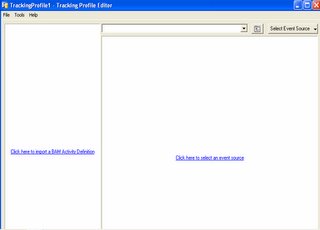
Use Tracking Profile Editor to map these variables from the Work Flow. i.e. In orchestration. These mapping points can be at send, receive shapes. Some field in the message body. Below is a pic of Editior.


I asked if fields need to be promoted to be accessed while mapping. The answer was NOT NECCESARILY.

BAM can also tap across multiple orchestrations across multiple servers.

He also gave an example how a variable that can change from one application to another can be still represented in the same row. Ie. PO ID: 123 can become SO ID: 246 in marketing application and SHIP ID: 243 in Shipping system. BAM can track this variable through out.

What is new in BAM 2006?

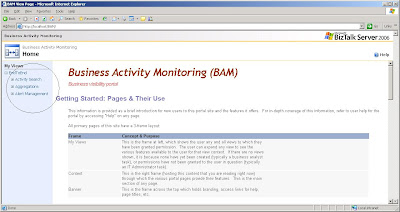
1) Out of box BAM Portal. Runs ASP.Net 2.0
2) Integration with Message Only scenario. i.e if Orchestrations not present in the end to end file process.
3) The BAM portal also has search feature.

Tuesday, March 28, 2006

Migration from Biztalk 2004 to Biztalk 2006

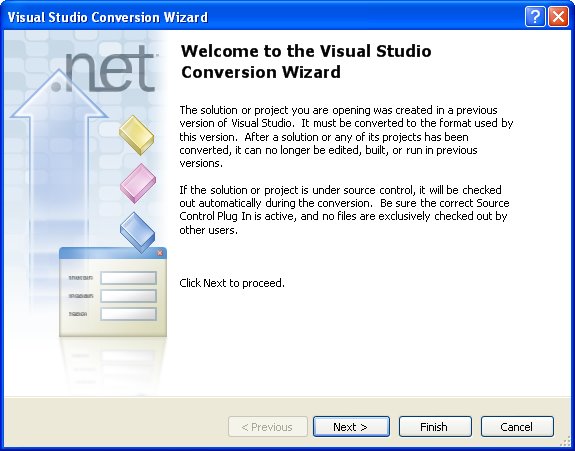
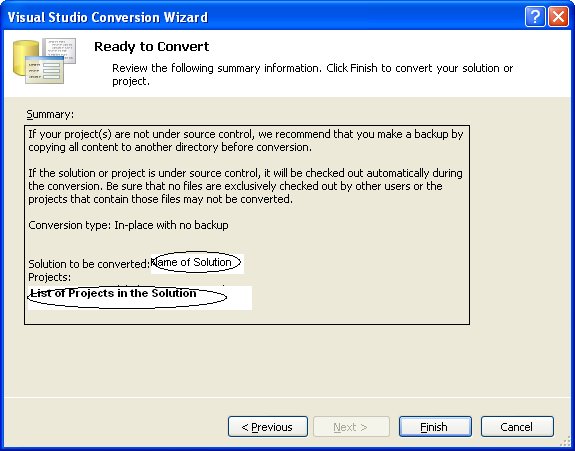
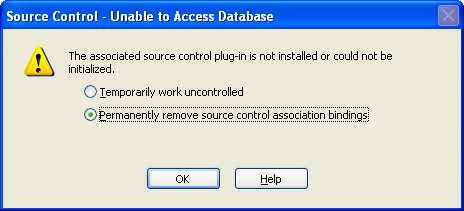
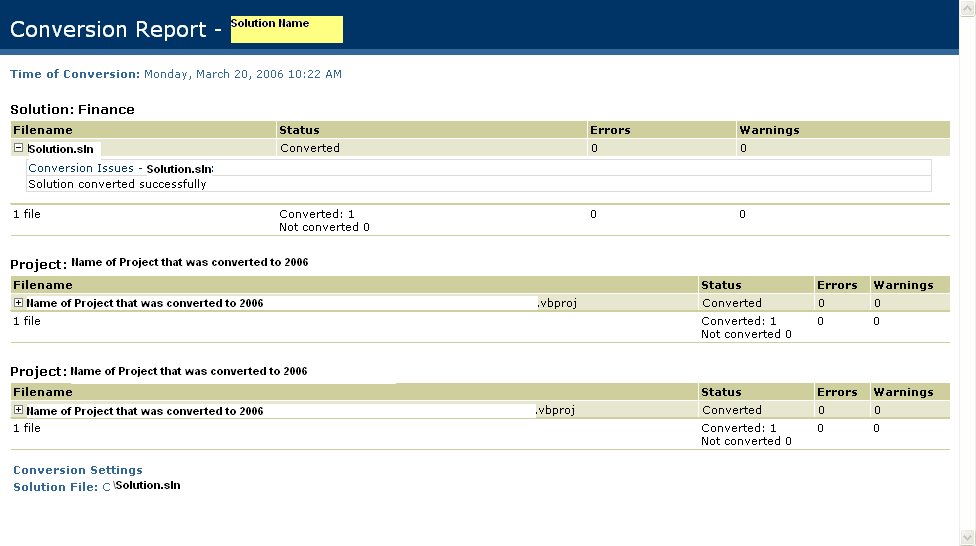
I recently converted a Biztalk 2004 project to Biztalk 2006. Believe me this time MSFT is right when they say that "Migration is very Simple". From my experience, all the orchestrations, pipeline, schemas and Maps (All Biztalk Artificats) were migrated without any changes. Some changes were required for some of the .Net functions that changed their signature from Studio 2003 to Studio 2005. Below are some screen shots of the wizard.


(This Final step gives the Migration Report)

BTW: Biztalk 2006 RTM is ready to roll!