This weekend I got down and dirty with BRE (Business Rule Engine). It is a powerful tool for managing dynamic business rules. It is very efficient in complex logic scenarios. I thought of playing with it and worked out some scenarios.
Scenario:Company wants to categorize its workers under different “Bonus” levels to decide on dollar value of annual bonuses. Each bonus level is based on variables like Number of Projects sold, Dollar value of each project sold. Is it a new client or existing one? Other variables like future potential etc can also play in. This business logic can change over period of time and needs to be controlled by Business Analysts/ Management team. That means no complex SQL queries. In real world scenario, this means having a policy that can interact with multiple databases/tables on client side. This policy can be invoked by a webservice . This webservice will pass on objects as facts in the BRE. BRE will then update the specified columns in the database with the correct “Bonus” categories.
Scenarios can range from simple scenarios that take single object as input fact to complex scenarios that take multiple objects.
Proof of Concept :1) Create a simple database called “TestRules”.
2) Create a table called “Customers”
3) Define 3 columns: Author, ID and Status
4) Create a policy called “Testing”.
5) Under this policy, define a rule “Test1” (Image 1)
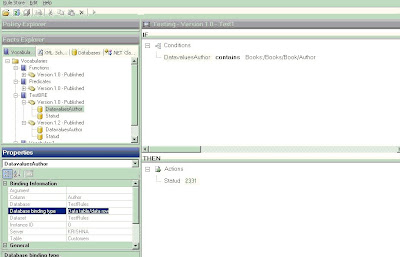
6) Define 2 Vocabularies TestBRE 1.0 and 1.2 (Image 2 and 3). Difference between them will be the nature of “Binding”. I will explain that later on.
Email me for complete solution @ shashi_1273@yahoo.comImage 1: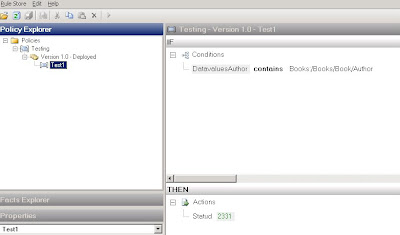 Image 2
(Database Binding type as DataConnection )
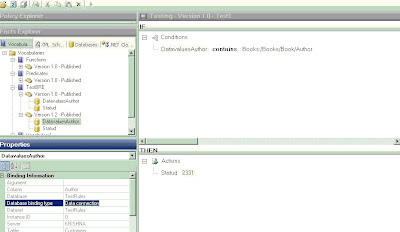 Image 3
(Database Binding type as Data Table/ Data Row )
 There are 3 facts in the rule:
1. Name of Author (Coming from Database)
2. Input Object on right hand side of “
Contains”. This can be a simple string that gives the lookup value as name of the “Author”. In a complex scenario this can be an XML object that contains multiple Fields for “Author”. These name(s) will be then matched against the “Author” column of database “Customers”.
3. StatuD under the action pane. This will be updated based on above 2 facts.
This policy can then be invoked by a WebService . This webservice will use
Policy.execute method after passing the required object parameters. For this Proof of Concept solution we will use following combinations:
1)
Passing Single Object as Parameter:In this case the object passed will be database connection only. The second fact can be a hard coded string i.e. “Shashi”. In 2 object scenario we will use an XML object instead of "string". This XML object will be array of values.
Implementation for 2 object scenario will cover this section too.2)
Passing Two Objects as Parameter:
In this case the object passed will be database connection and a XML document. This XML document can contain multiple fields and one of the fields can be “Author”. This “Author” field can have multiple names. In our sample we have 3 names: Shashi, Kent and Jeff.
a) Database Binding type as DataConnection
b) Database Binding type as Data Table/ Data Row
Both of the above types can be set up while using Wizard to creating Vocabulary. Use DataConnection type if the count of rows returned is more than 10 (
http://blogs.msdn.com/biztalkbre/ ). Otherwise use Data Table type. Also for Long Term Facts that are based on Caching, use
Data Table/ Data Row Type. Reason being that no additional benefit will be gained by caching Dataconnection object as Connection Pool already does that. Implement IFact Retriever for Long Term facts. For this particular example, we will not use Long Term facts.
Important thing to note is that in case of Database facts ( with binding type Data Table/ Data Row ) and XML facts, Typed objects need to be used. .Net facts do not need any “Typing”. You will see in the implementation how both XML and Database facts use TypedXMLDocument and TypedDataTable respectively.
It is a good practice to create a tracking file to understand how BRE works and this file can also be used as a Debugging tool.
Implementation for Case a)
SqlConnection conn = new SqlConnection("Integrated Security = SSPI;Database= TestRules; Server =(local)"); // establish connection to server
conn.Open(); //open the connection
DataConnection dc = new DataConnection("TestRules", "Customers", conn);
XmlDocument xd1 = new XmlDocument();
xd1.Load(@"C:\BiztalkProjects\BRE\TestSmall.xml");
TypedXmlDocument doc1 = new TypedXmlDocument("Books", xd1);
object[] shortTermFacts = new object[2];
shortTermFacts[0] = doc1;
shortTermFacts[1] = dc; //
Note: No Typed dataset being used in this implementationPolicy pol = new Policy("Testing",1,0);
DebugTrackingInterceptor dtraking = new DebugTrackingInterceptor("ShashiOut.txt");
try
{ pol.Execute(shortTermFacts, dtraking);
dc.Update();
conn.Close();
}
catch (Exception ex)
{ System.Console.WriteLine(ex.ToString()); }
Implementation for Case b)SqlConnection conn = new SqlConnection("Integrated Security = SSPI;Database= TestRules; Server =(local)"); // establish connection to server
conn.Open(); //open the connection
SqlDataAdapter da = new SqlDataAdapter("select * from Customers", conn); // create adapter to fill dataset .
//------explicitly define Update method for database adapter object. Directly using da.update will give error
SqlCommandBuilder commBldr= new SqlCommandBuilder(da);
commBldr.GetUpdateCommand();
da.UpdateCommand = commBldr.GetUpdateCommand();
//...
DataSet ds = new DataSet("TestRules"); // create a dataset
da.Fill(ds, "Customers"); //fill dataset
//....Not required for Single Object scenarioXmlDocument xd1 = new XmlDocument();
xd1.Load(@"C:\BiztalkProjects\BRE\TestSmall.xml"); //xml instance to be passed
TypedXmlDocument doc1 = new TypedXmlDocument("Books", xd1);
//............
TypedDataTable tdc = new TypedDataTable(ds.Tables["Customers"]);
// Only pass one fact (tdc) for single
object scenario (First scenario)
object[] shortTermFacts = new object[2];
shortTermFacts[0] = doc1;
shortTermFacts[1] = tdc;
Policy pol = new Policy("Testing",1,0); //Major and Minor Versions
DebugTrackingInterceptor dtraking = new DebugTrackingInterceptor("ShashiOut.txt"); //writes the debug file under the "bin" folder.
try
{ pol.Execute(shortTermFacts, dtraking);
da.Update(ds,"Customers");
conn.Close();
} catch (Exception ex)
{ System.Console.WriteLine(ex.ToString()); }
}
}
}
Take Away :
1) While testing a Policy, BRE create Database connection/objects. While executing the policy from .net class, database objects need to be explicitly created.
2) It is a good practice to create tracking file while executing policy. This can help to troubleshoot issues while development. It can also be compared with the tracking log that is created by Business Rule composer when Testing a policy. This way we can observe the list of parameters that policy is expecting and make sure that these parameters are correcly passed while executing the same policy from outside Rule Composer. By comparing these 2 logs, I was able to figure out when policy is expecting TypedXMLDocument and TypedDataTable.
3) DataSet object and XML document have to be passed as "Typed".
4) The 2 Object scenario can be extended for multiple Objects.
5) I know it is very painful to copy and create new versions of policy whenever any modifications are required. Same applies to vocab. Following SQL commands can ease that pain by undeploying the policies/vocabs and allowing users to do modifications. It is highly recommended that these commands are used only in Development phase.
For Policies:
declare @RuleSetId Int
select @RuleSetID =nRuleSetID
FROM re_Ruleset
WHERE strName = 'Testing'
AND nMajor=1 and nMinor=0
UPDATE re_ruleset
SET nStatus =0
WHERE nRuleSetID = @RuleSetID
DELETE FROM re_deployment_config WHERE nRuleSetID=@RuleSetID
DELETE from re_tracking_id WHERE nRuleSetID=@RuleSetID
For Vocabs:
UPDATE re_VocabularySET nStatus = 0 /* to republish make it back to 1 */
WHERE strName = 'Vocabulary1' AND nMajor =1 AND nMinor=0
I think BRE is a very powerful tool if used properly. Key is to use it for complex scenarios that can leverage functions like Update, Assert, Retract. Using it for simple queries is an example of under utilization of tool. In terms of performance, BRE will work better than traditional SQL query in case of complex scenarios.
It is not truely a Business User tool. Concepts of version, vocabulary and facts are not easy for a business user to understand. Also, the fact that any policy that deployed can't be changed unless a new version is created is not helpful either. Developers are required for initial set up and creating new vocab etc. Business users can definitely change variable values that are already set up. They will need some training to do more than that.
I would imagine that MSFT understands these concerns and we can definitely see improvements in subsequent versions.


